

Your website logo is more than just a visual; it is the face of your brand. Yet, for many WordPress website owners, designing a professional logo often means spending hours with a designer or wrestling with complicated design tools. That is exactly where an AI logo generator for website comes in. With the rise of AI-powered tools, creating a unique, professional logo no longer requires design skills, a big budget, or a separate workflow.
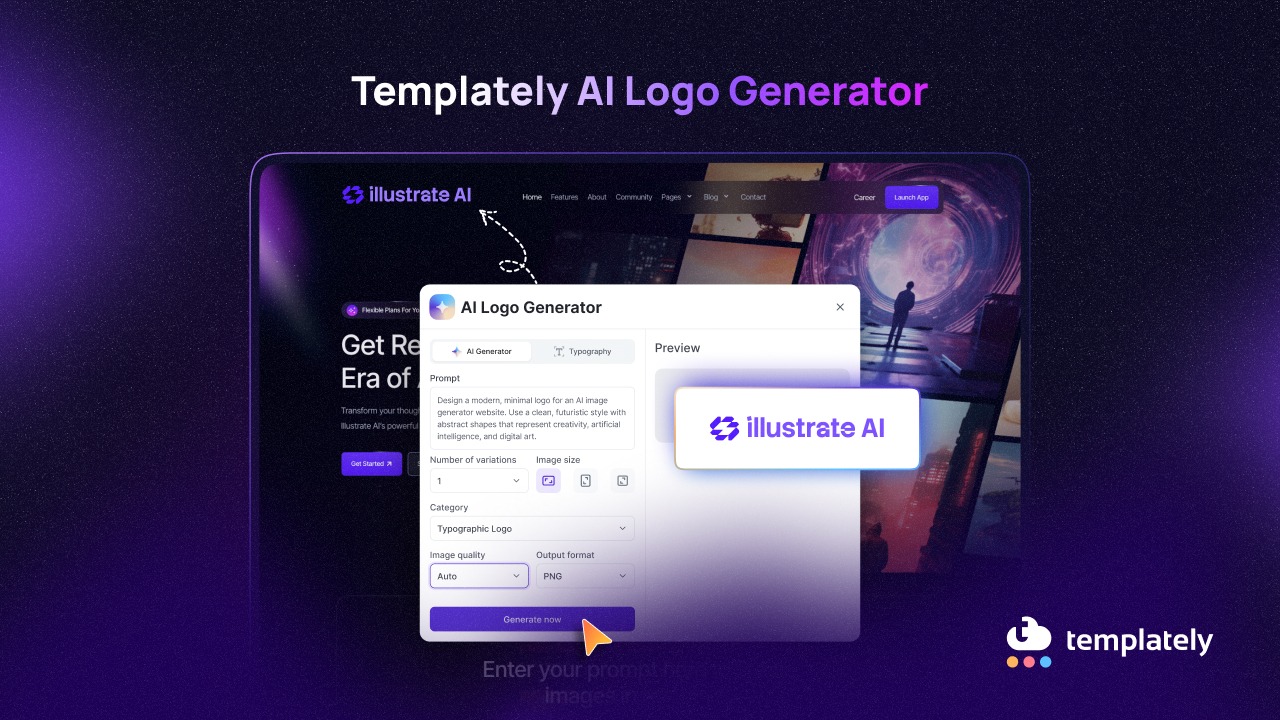
Templately, the popular AI-powered WordPress template cloud platform, has taken this a step further by bringing a built-in logo generator with AI directly into the website-building process. Now, you can generate a logo with AI without ever leaving your WordPress dashboard — right when you are setting up your website. In this guide, we will walk you through everything you need to know about this exciting feature and why it is worth using.
Why a Great Logo Matters on a Website?
Before diving into the feature itself, it is worth understanding why investing in a quality logo is so important for your online presence. A logo is not just decoration; it carries the weight of your brand identity.
First Thing Visitors Notice
When someone lands on your website, their eyes go straight to the header and your logo is right there. Within seconds, a visitor forms an impression of your brand. A clean, professional logo signals credibility and tells visitors they are in the right place. A poorly designed or missing logo, on the other hand, can make even a beautifully built website feel untrustworthy.
Brand Recognition Over Time
Consistent use of a well-crafted logo across your website, social media and marketing materials helps people remember your brand. Thinking about any major brand and its logo alone is enough to identify it instantly. Even for small businesses and bloggers, a memorable logo creates that same sense of familiarity with your audience over time.
Communicates Your Brand Personality
Colors, shapes, typography, every element of a logo conveys something about your brand. A handwritten-style logo feels personal and creative. A sharp geometric mark feels modern and professional. A typographic logo feels clean and authoritative. The logo silently communicates who you are before a single word is read on your website.
Competitive Advantage
In a saturated digital space, your logo is one of the fastest ways to differentiate yourself. A unique, well-thought-out logo tells your audience that your brand has its own identity, one that stands apart from generic or template-like competitors. It is a small detail that makes a big difference.
Introducing AI Logo Generator by Templately
Templately has always been about making website building faster and easier for WordPress users. With the launch of the AI Logo Generator feature, it goes one step further by eliminating the need for any external logo design tool.
The feature is seamlessly integrated into Templately’s website import flow. When you choose a template pack and click on Build Full Website, you are prompted to generate your logo right at that stage, before the site even goes live. This means your logo is placed and configured as part of the website setup, saving you a significant amount of time.
Here is a quick look at what the AI Logo Generator offers:
- Prompt-based generation: Simply describe the kind of logo you want, your business type, style preference, or mood and the AI generates it accordingly.
- Multiple variations: You can generate more than one logo variation at once and pick the one that best represents your brand.
- Logo categories: Choose from three distinct styles, Typographic Logo, Shape Logo, or Handwritten Logo, depending on the identity you want to build.
- Image size and quality control: Select horizontal or vertical orientations and choose from High, Medium, or Low image quality.
- Output format: Export your logo in JPG or PNG format, depending on your website’s needs.
- Typography customization: Beyond AI generation, you can also add and customize typography, including text, font family, font weight, font size, colors and more, to fine-tune your logo further.
This is not a standalone logo tool. It is a complete logo creation experience baked directly into your WordPress website workflow.
How to Add an AI-Generated Logo to a WordPress Website?
Now, it is time to know the step-by-step process of generating a complete logo on your WordPress website. Before getting started, make sure you have installed Templately on your WordPress website and created a Templately account.
Step 1: Choose the Template
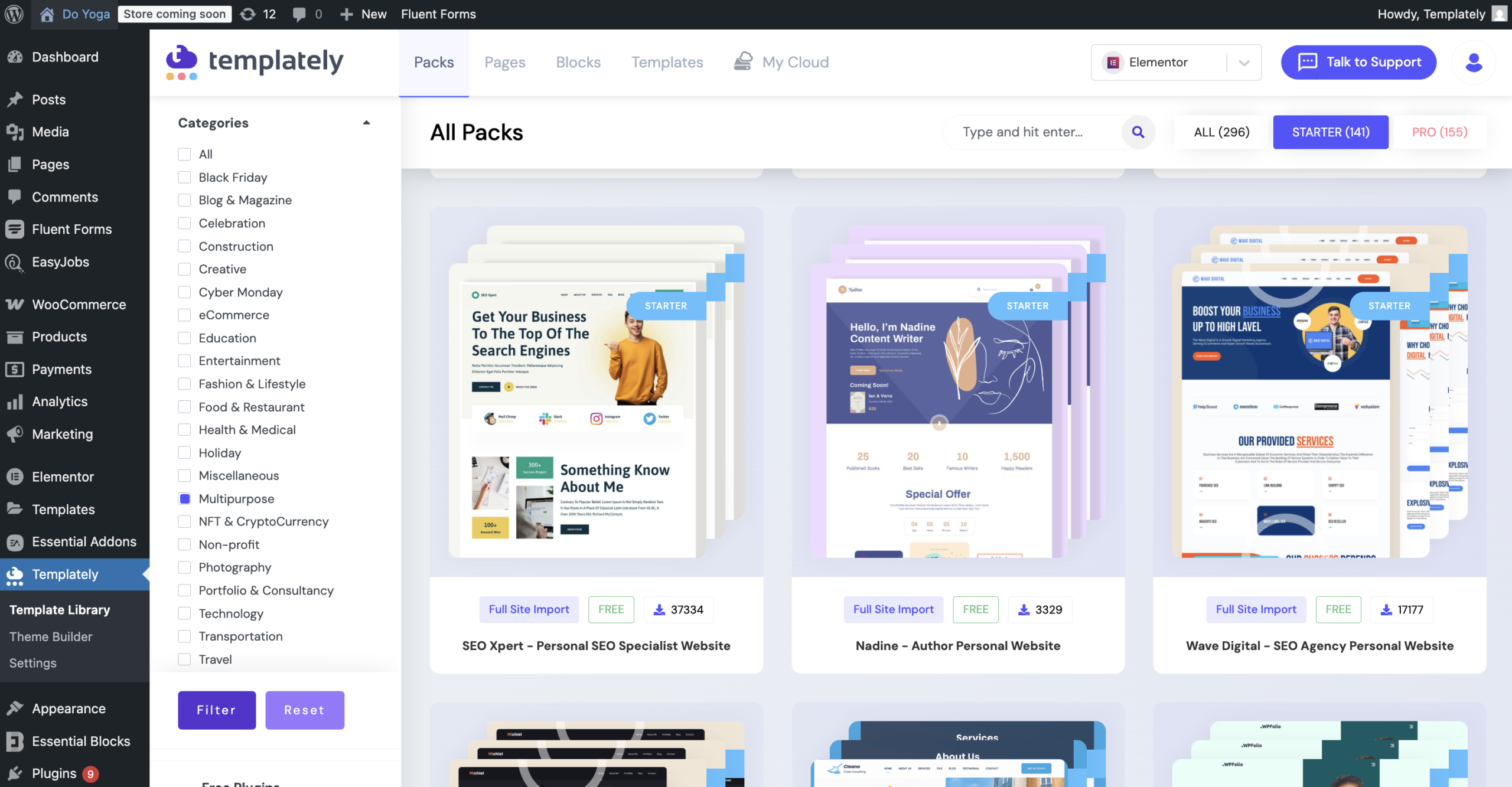
First, from the template library, choose a template where you want to generate the logo with AI. After logging in to your Templately account, you will find a complete template library. Choose the perfect template pack based on your preference.
Step 2: Build a Full Website
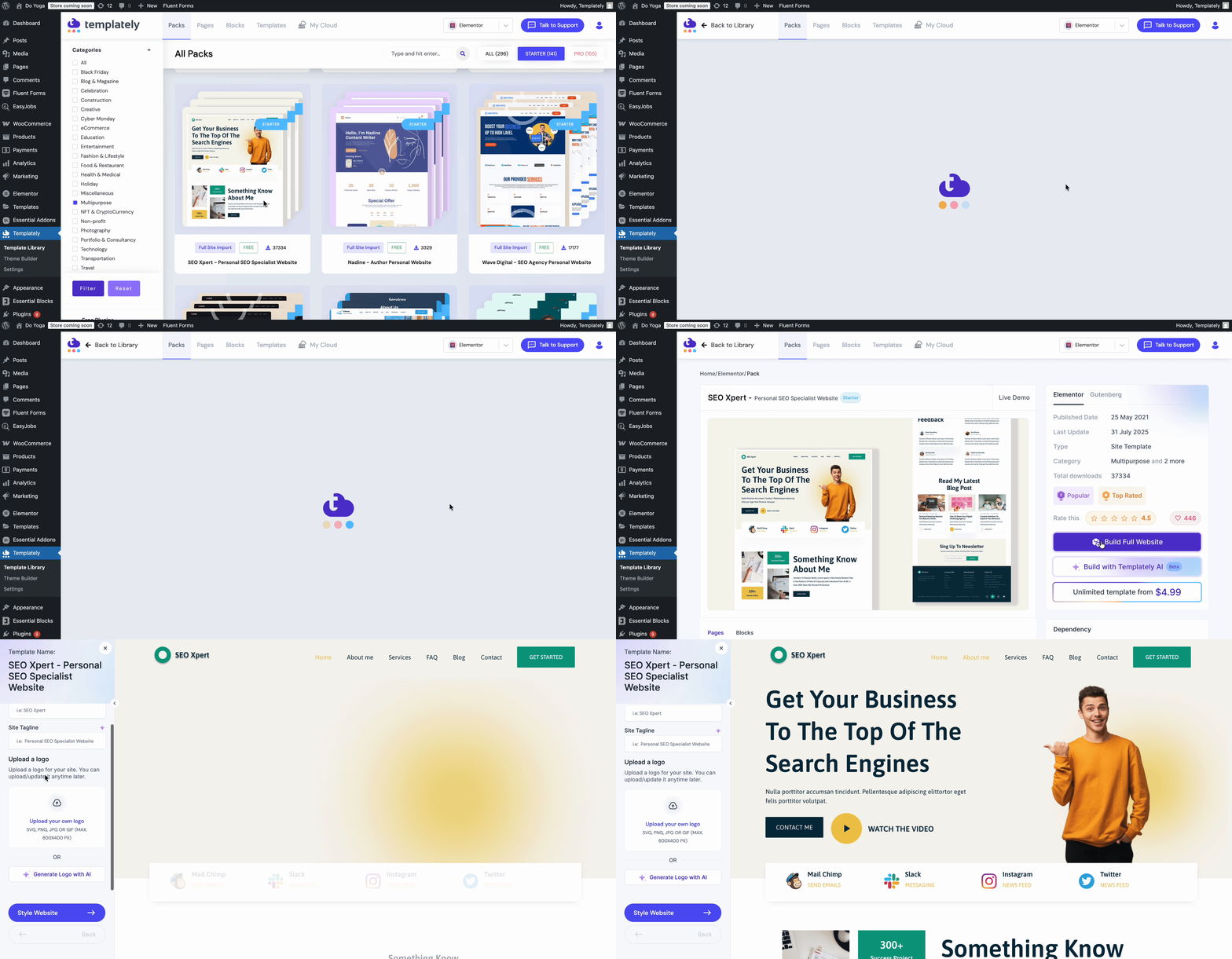
After choosing your template, click on the ‘Build Full Website’ button. It will take you to the customization part, where you can add the site title, tagline and upload or generate a logo with AI.
Step 3: Generate Logo with AI
Then click on “Generate Logo with AI”. There will be a window that pops up where you can give a prompt, choose variations, category, image size & quality and choose an output format. Then click on “Generate Now,” and the logo will be generated. After that, click on ‘Insert,’ and the logo will be automatically inserted on the website. You can manage the size of the logo as well.

This is how you can simply generate a website logo instantly with AI. To know more details, check the documentation.
Who Can Benefit from the AI Logo Generator Feature?
The beauty of this feature is that it is not designed for any one type of user; it serves a wide range of WordPress website owners.
Small Business Owners
For small business owners who are setting up their first website, hiring a professional designer is often out of budget. The AI Logo Generator gives them a professional-looking result quickly without any design expertise or extra cost.
Freelancers And Web Design Agencies
Freelancers and agencies building websites for clients can use this feature to deliver complete, ready-to-launch websites with logos already in place. It speeds up the turnaround time while still giving clients a customized branding element from day one.
Bloggers And Content Creators
Personal bloggers and content creators often overlook logo design because it seems complicated or unimportant. With Templately’s AI, even a blogger setting up a niche website can have a polished logo generated in minutes, making their site look more professional and trustworthy to readers.
Startups And Entrepreneurs
Startups in their early stages need to move fast. Waiting on brand assets can delay website launches. With the ability to generate a logo with AI instantly during the site setup, founders can get their online presence up without bottlenecks in the design phase.
Non-Profit Organizations

Nonprofits often work with limited resources. A built-in AI logo feature means volunteers and coordinators can build and brand their websites without needing to outsource design work — keeping costs down while still presenting a professional image to donors and supporters.
Tips to Get the Best Results for an AI-Generated Logo
Knowing how to generate a logo with AI is one thing, but getting the best result takes a little strategy. Here are some practical tips to help you make the most of Templately’s AI Logo Generator.
Write a Clear And Descriptive Prompt
The AI generates your logo based on the text prompt you provide. The more specific and descriptive you are, the better the output. Instead of typing “business logo,” try something like “modern minimalist logo for a digital marketing agency with blue tones.” Specificity leads to better results.
Choose the Right Logo Category
Templately gives you three logo categories: Typographic, Shape and Handwritten. Think about your brand personality before selecting. A law firm might benefit from a clean typographic logo, while a creative studio might love a handwritten style. Matching the category to your brand identity makes the result feel more intentional.
Generate Multiple Variations
Do not settle for the first output. Use the Number of variations option to generate several versions at once. Seeing multiple options side by side helps you make a more confident choice and often surfaces a design you would not have thought to prompt for.
Use Typography Customization to Personalize
Once your AI-generated logo is ready, take advantage of the Typography option. Adding your brand name with the right font, adjusting the size, and setting brand colors can transform a good AI-generated mark into a logo that feels truly custom-made.
Match Your Logo Format to Your Website
If your website has a light background, go with PNG for transparency support. If file size matters more and your background is solid, JPG works great. Choosing the right output format ensures your logo always looks sharp and clean across your site.
Build Your Brand Faster with Templately AI Logo Generator
A great logo is no longer a luxury reserved for brands with big budgets or design teams. With Templately’s AI logo generator for websites, anyone building a WordPress website can create a professional, unique logo in minutes — directly within the website setup process. Whether you are a small business owner, a freelancer, a blogger, or a startup founder, this feature removes one more barrier between you and a fully branded, launch-ready website.
Ready to see it in action? Try the AI Logo Generator by Templately and take the first step toward a stronger brand identity without the design headache. Do not forget to subscribe to our blog and join our Facebook Community for more tips, guides and tutorials.